WiFi Attack
Rogue AP: Fake Access Point Attacks
Technical documentation on Rogue Access Point Attacks. Understand the attack technique and learn how to defend against it.
Medium Threat
Intermediate
A rogue AP is an unauthorized wireless access point operating within range of a network that should not have one. There are two fundamentally different categories:
- Malicious rogue AP: Deliberately planted by an attacker to intercept, inject, or relay network traffic. This is the primary concern for security teams.
- Accidental/misconfigured rogue AP: An employee or IT team member connects a router, mesh node, or hotspot to the corporate network without following change management procedures. These create security gaps even without malicious intent.
The danger of a rogue AP is that it sits invisibly alongside legitimate infrastructure. Once connected to a network port or bridged with an existing AP, it becomes a bridge between the trusted wired network and any wireless client that associates with it. An attacker who controls that rogue AP effectively has a foothold inside the perimeter — past the firewall, past the IDS — on the inside of the network.
How Rogue APs Appear on Networks
Accidental Creation by IT Teams
The most common source of rogue APs is not attackers — it's miscommunication and shortcuts within IT departments. Common scenarios:
- A network engineer plugs a consumer-grade router into a conference room Ethernet port to provide "temporary" WiFi for a meeting, and never removes it
- An employee connects a mobile hotspot's USB tethering to their work laptop, then bridges it to the corporate WiFi adapter — creating an ad-hoc rogue AP on the corporate network
- A facilities team installs a new IP camera or IoT device with built-in WiFi, broadcasting its own SSID inside the building
- A contractor or vendor leaves a portable travel router configured with a default SSID and no encryption, connected to the corporate switch
The Default SSID Problem
Consumer routers from Netgear, TP-Link, and TP-Link's Omada line often ship with SSIDs like "TP-Link_XXXX" or "NETGEAR-2.4G". When these get plugged into corporate networks by accident, they're immediately identifiable as rogue. Sophisticated attackers know this and configure their rogue APs with similarly innocuous-looking default SSIDs to blend in with the noise of accidental deployments.
Deliberate Planting by Attackers
When an attacker deliberately installs a rogue AP, they have full control over its configuration. The attacker's goals typically include:
- Traffic interception: Acting as a man-in-the-middle between wireless clients and the legitimate network
- Credential harvesting: Capturing WPA2 handshakes, captive portal credentials, or plaintext authentication tokens
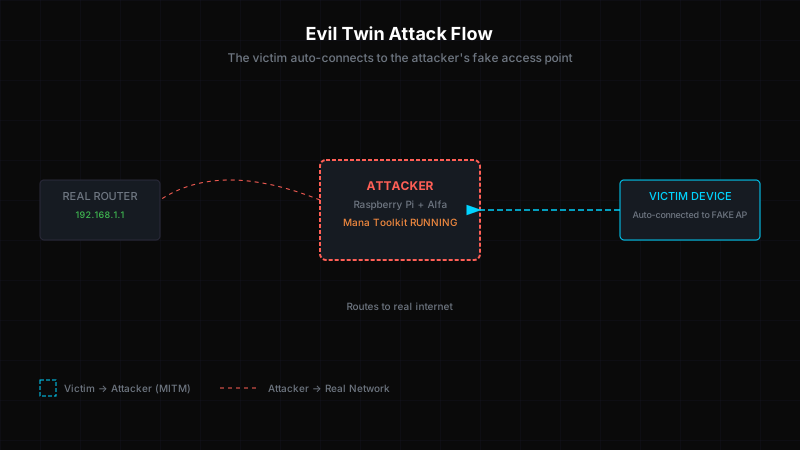
- Evil twin attacks: Cloning the ESSID and BSSID of a legitimate AP to trick nearby users into connecting automatically
- Persistent access: Installing a small, difficult-to-detect device that phones home, providing ongoing access even after the attacker leaves the premises
Physical access requirements vary. In a corporate campus, an attacker might pose as a vendor, HVAC technician, or cleaning staff to gain access to a wiring closet, server room, or open office. In a co-working building, they might simply set up a rogue AP in a common area and wait for nearby devices to connect.
Honeypot AP and Enticement Attacks
A honeypot AP is a rogue AP specifically designed to lure victims. Rather than cloning an existing network (evil twin), the attacker creates an attractive, open network with a compelling name. The goal is to get as many users to connect as possible, then harvest their traffic.
Choosing the Right SSID
SSID selection is a form of social engineering. Effective honeypot SSIDs include:
Free_WiFiorFree Public WiFi— classic bait, still effective in public spacesStarbucks_WiFi,Airport_Free_WiFi,Hotel_Guest— users expect these in specific venuesCorporate_5Gor the real company name with "Private" — targets corporate users in office buildingsXBOX_LIVE,Sony_PS4— targets gaming and entertainment devices with auto-connect features
$ # Create an attractive honeypot AP with hostapd

$ sudo hostapd /etc/hostapd/evil_hotspot.conf


Configuration: /etc/hostapd/evil_hotspot.conf

interface=wlan0

ssid=Free_WiFi

hw_mode=g

channel=6

macaddr_acl=0

auth_algs=1

ignore_broadcast_ssid=0


[Open, unauthenticated access point — no WPA, no captive portal]

[Any nearby device configured to auto-connect to open networks will associate]
Why Users Connect to Honeypots
Most modern devices are configured to automatically reconnect to known open WiFi networks. If a user's laptop previously connected to "Free_WiFi" at an airport lounge, it will attempt to connect to any AP broadcasting that SSID — including a honeypot in a corporate parking lot. This behavior is baked into Windows, macOS, iOS, and Android and is extremely difficult to fully disable.
The Auto-Connect Attack Surface
When a device auto-connects to a honeypot AP, it often performs background network activities immediately upon association: checking for software updates, syncing email, uploading crash reports, authenticating to cloud services. All of this traffic passes through the attacker-controlled AP before reaching the internet, making it visible to interception. Users who then open a browser and enter credentials into a captive portal login page are handing those credentials directly to the attacker.
Traffic Interception and Data Theft
Once a rogue AP is connected to the corporate network or is being used as an evil twin, the attacker has a full range of interception capabilities. The exact impact depends on the attacker's positioning and what protections (if any) the victims have in place.
Passive Traffic Capture
If the rogue AP runs in open (no encryption) mode, all traffic from connected clients is readable by the attacker without any additional steps. On Linux, a simple tcpdump or Wireshark capture on the bridge interface gives the attacker a complete packet capture of everything those clients do on the network.
$ # Bridge the rogue AP interface to the wired network

$ sudo ip link add br0 type bridge

$ sudo ip link set eth0 master br0

$ sudo ip link set wlan0 master br0

$ sudo ip link set br0 up


$ # Capture all traffic passing through the rogue AP

$ sudo tcpdump -i br0 -w rogue_capture.pcap


tcpdump: listening on br0, link-type EN10MB

Capture size 262144 bytes

[... users connect, browse, check email ...]

Got 100000 packets: 100000 on br0

[Full packet capture of all client traffic — readable in Wireshark]
Using Wireshark, the attacker can extract:
- HTTP request/response bodies including form data and session cookies
- Email subject lines and attachments (IMAP/POP3 without TLS)
- File transfers (SMB, FTP)
- Authentication tokens from mobile app API calls
ARP Spoofing and Man-in-the-Middle
When the rogue AP is connected to the legitimate network via Ethernet or bridge, the attacker can use ARP spoofing to become the default gateway for all wired and wireless clients on the segment. This gives them visibility into all traffic leaving the subnet, not just wireless clients.
$ # Enable IP forwarding

$ echo 1 | sudo tee /proc/sys/net/ipv4/ip_forward


$ # ARP spoof the default gateway (e.g., 192.168.1.1)

$ sudo arpspoof -i eth0 -t 192.168.1.1 192.168.1.100 &

$ sudo arpspoof -i eth0 -t 192.168.1.100 192.168.1.1 &


[Attacker sits between all clients and the gateway]

[SSL/TLS traffic can be stripped or intercepted depending on config]

[All traffic visible — HTTP sessions, API calls, VPN tunnels]
Corporate Impact — Why This Matters
A successful rogue AP deployment in a corporate environment is one of the most severe initial access scenarios because it effectively places the attacker on the internal network without requiring any exploitation of vulnerabilities or credentials.
Post-Access Capabilities
Once an attacker has a rogue AP with connectivity to the internal network, they can:
- Scan and map internal subnets — identify file servers, databases, internal admin panels, and vulnerable services
- Reach internal-only applications — many enterprises have internal tools (HR systems, DevOps dashboards, monitoring consoles) that are completely unauthenticated or protected only by IP allow-lists that the attacker is now inside
- Lateral movement — use harvested credentials or exploit unpatched internal servers to expand access
- Data exfiltration — copy sensitive files from accessible network shares
- Persistence — install a reverse shell, schedule tasks, or create additional backdoor accounts
Rogue AP + Default Credentials = Full Network Compromise
Many corporate networking devices — switches, routers, wireless controllers — still ship with default administrative credentials or have poorly configured SNMP community strings. Once an attacker is inside the internal network via a rogue AP, they often find these devices reachable on their management VLANs. A single misconfigured Cisco switch with community string public can give an attacker full read-write SNMP access to the entire network infrastructure, allowing them to reconfigure ACLs, VLAN assignments, and port security at will.
Real Scenario: The Parking Lot Breach
A penetration testing team was contracted to assess a mid-size financial services firm in a multi-story office building. Their objective: gain access to the internal network without physically entering the building beyond the lobby.
The tester sat in the parking garage across the street and ran a reconnaissance sweep. Within 30 minutes, they identified several SSIDs leaking from the building, including the corporate 5GHz network (which attenuated poorly through the building's glass facade) and a second SSID broadcasting from a floor that was almost certainly not a managed corporate AP.
Further investigation revealed the second SSID: DIRECT-77-HP-OfficeJet-Pro — an HP printer's built-in WiFi Direct feature. The printer had been connected to the corporate network via Ethernet, and its WiFi radio was broadcasting a personal hotspot SSID that was visible from the parking garage.
The tester connected to the printer's WiFi Direct network and ran an Nmap scan. The printer's admin interface was accessible on the wired network segment, and the default admin password had never been changed. Through the printer's web interface, the tester accessed the address book, scanned documents stored in memory, and found SMB credentials for a service account that had access to internal file shares.
From there, lateral movement led to the domain controller. Total time from parking garage to domain admin: 4 hours, 12 minutes.
Detection Methods
Wireless Intrusion Detection Systems (WIDS)
A production-grade WIDS monitors the RF environment for unauthorized APs by correlating observed BSSIDs, ESSIDs, channel assignments, and signal strengths against a known-good database. Commercial WIDS platforms like Cisco DNA Center, Aruba AirWave, and MetaGeekChanalyzer can detect rogue APs by comparing AP fingerprints across multiple sensor APs and triangulating their physical location.
$ # Passive WiFi reconnaissance with airodump-ng $ sudo airmon-ng start wlan0 phy0 wlan0mon rt2800usb $ sudo airodump-ng wlan0mon --信道 1,6,11 --write wifi_inventory CH 1 ][ Elapsed: 12 s ][ 2026-04-07 10:23 BSSID PWR Beacons #DATA CH MB ENC ESSID DE:AD:BE:EF:00:01 -38 127 89 6 540 WPA2 CorpNet-5G [KNOWN — Managed AP] AA:BB:CC:DD:EE:FF -67 34 0 1 540 WPA2 CorpNet-2.4G [KNOWN — Managed AP] 11:22:33:44:55:66 -71 12 0 11 540 Open DIRECT-HP-7A3B [NEW — Not in known-good database] 77:88:99:AA:BB:CC -82 8 0 6 540 WPA2 Free_WiFi [ROGUE SUSPECT — Honeypot near building] [Compare against known-good AP inventory: 11:22:33:44:55:66 and 77:88:99:AA:BB:CC are not in the database]Signature-Based Detection
WIDS platforms maintain AP signature databases that include manufacturer OUI, supported rates, beacon frames, and configuration fingerprints. Anomalies are flagged when:
- A BSSID with a known-good ESSID appears on a different channel than expected
- A new AP with the same vendor OUI as corporate hardware broadcasts from an unexpected location
- An AP's beacon interval, DTIM period, or supported rate set deviates from the organization's standard configuration
Behavioral Detection
Modern detection approaches use machine learning to build behavioral baselines for the RF environment. An alert triggers when:
- The total number of APs on a given channel increases unexpectedly
- New ESSIDs appear with high client probe response rates (indicating an effective honeypot)
- Signal strength patterns suggest an AP has been moved or is being used in a different physical location than its installation record indicates
The Rogue AP Detection Challenge
Rogue APs are notoriously difficult to detect because the attacker controls the AP's configuration. A well-configured rogue AP using the same chipset, firmware, OUI, channel, ESSID, and beacon timing as the legitimate infrastructure will look identical in a passive scan. Detection at scale requires multi-point correlation, active probing, and continuous RF baseline monitoring — not just periodic site surveys.
Defending Against Rogue APs
- Disable unused WiFi radios on all corporate devices: Managed laptops should have internal WiFi disabled or locked down via MDM. Eliminate personal hotspots, printer WiFi, and IoT device WiFi from corporate network segments.
- Enforce 802.1X on wired ports: Even if an attacker plugs a rogue AP into a wall jack, 802.1X port-based network access control (PNAC) will prevent the AP from authenticating to the network and becoming a bridge.
- Deploy WIDS enterprise monitoring: Organizations with significant wireless footprints should deploy a dedicated WIDS or use the wireless intrusion detection capabilities built into their enterprise wireless infrastructure (Aruba, Cisco, Juniper Mist).
- Conduct regular wireless site surveys: Annual or semi-annual active site surveys with spectrum analysis can identify unexpected APs that have been added to the RF environment.
- Implement network access control (NAC): NAC solutions like Forescout, Aruba ClearPass, and Cisco ISE can detect and quarantine unauthorized devices attempting to connect to the network, including rogue APs.
- Physical security: Lock server rooms and wiring closets. Ensure Ethernet ports in public areas (conference rooms, lobbies, reception) are disabled or monitored for unexpected device connections.
Understand the Threat. Build the Defense.
Learn how to protect yourself and your organization against Rogue Ap attacks.